



Before investing more time in AI, ask yourself:
- Which recurring task consumes more staff time than it should?
- Could your team clearly describe what a successful AI result looks like?
- Would someone be able to catch a mistake before it reaches a client?
For small and midsize businesses, a useful starting point is a frequent, clearly defined task with approved information, a result someone can verify, and a measurable business benefit.
Choosing that first workflow carefully gives your team a manageable way to learn, build confidence, and determine where AI belongs in your operations.
Start With a Task Your Team Already Understands
Imagine an operations manager at a growing Bay Area business. Every week, she gathers routine updates from department leads and turns them into an internal summary.
The work follows a familiar pattern. She organizes the updates, removes repetition, identifies open items, and prepares a draft for review.
That could be a useful AI pilot, provided the information and platform are approved for the task. The manager already understands the source material and knows what a good summary should contain.
Now compare that with asking AI to independently interpret a complicated client agreement and recommend a business decision. Reviewing the result requires more expertise, and an overlooked mistake could have greater consequences.
Both involve processing text. Their suitability as a first workflow is very different.
A strong starting point has a clear beginning, a defined output, and a person responsible for checking the result.
Five Questions to Help You Choose
1. Does the task happen often enough to matter?
Look for work your employees repeat daily or weekly.
Potential candidates include preparing routine communications, reformatting approved content, organizing nonconfidential notes, or turning documented instructions into a draft checklist.
Frequency matters because it gives you repeated opportunities to test the workflow and compare results.
Ask your team:
“What do you find yourself doing again and again that follows roughly the same process?”
Their answers can reveal opportunities that leadership may not see.
2. How much time could you realistically save?
Measure the existing task before introducing AI. Include the time spent gathering information, creating the output, reviewing it, and making corrections.
Then measure the same complete process during the pilot.
For example, suppose a task takes 40 minutes today. With AI, preparing the input takes five minutes, generating the draft takes two minutes, and reviewing and correcting it takes 18 minutes.
The total is 25 minutes, for a net saving of 15 minutes.
That is an illustrative calculation, not a promised result. It shows why the speed of generating a draft alone is an incomplete measure of success.
The useful question is: Does AI reduce the total effort required to produce acceptable work?
3. What information does the task require?
Before testing a workflow, identify exactly what employees would need to provide to the AI system.
Public website copy is different from a confidential proposal. A generic checklist is different from an employee record.
For an initial pilot, favor tasks that can use public, synthetic, or explicitly approved information. Confirm that the platform, account settings, and intended use are appropriate for that information.
If the task requires sensitive data, involve your IT and security team before proceeding. Removing a person’s name alone may not remove all identifying or confidential details.
Your first workflow should be easy to operate within the boundaries your business has established.
4. Can a qualified person verify the output?
Choose work where the reviewer can compare the result with a trusted source.
For example, a marketing employee can check whether a draft social post accurately reflects an approved article. An operations manager can compare a draft checklist with an existing procedure.
Verification becomes harder when the output contains unfamiliar claims, specialized judgments, or conclusions that require extensive research.
Define the review before starting:
- Who will check the result?
- What source will they compare it against?
- What errors would make the output unacceptable?
- Who approves it for use?
If nobody can confidently assess the result, choose a different first workflow.
5. What happens if the AI gets it wrong?
Think about the consequences of an error and whether it can be caught before anyone acts on it.
An awkward sentence in an internal draft is usually easy to fix. An incorrect price, promise, or instruction sent directly to a client can be much harder to unwind.
For your first pilot, keep a person between the AI output and any external communication or consequential action.
Drafting, organizing, and suggesting are useful starting roles. Give your team time to understand the workflow before expanding its responsibilities.
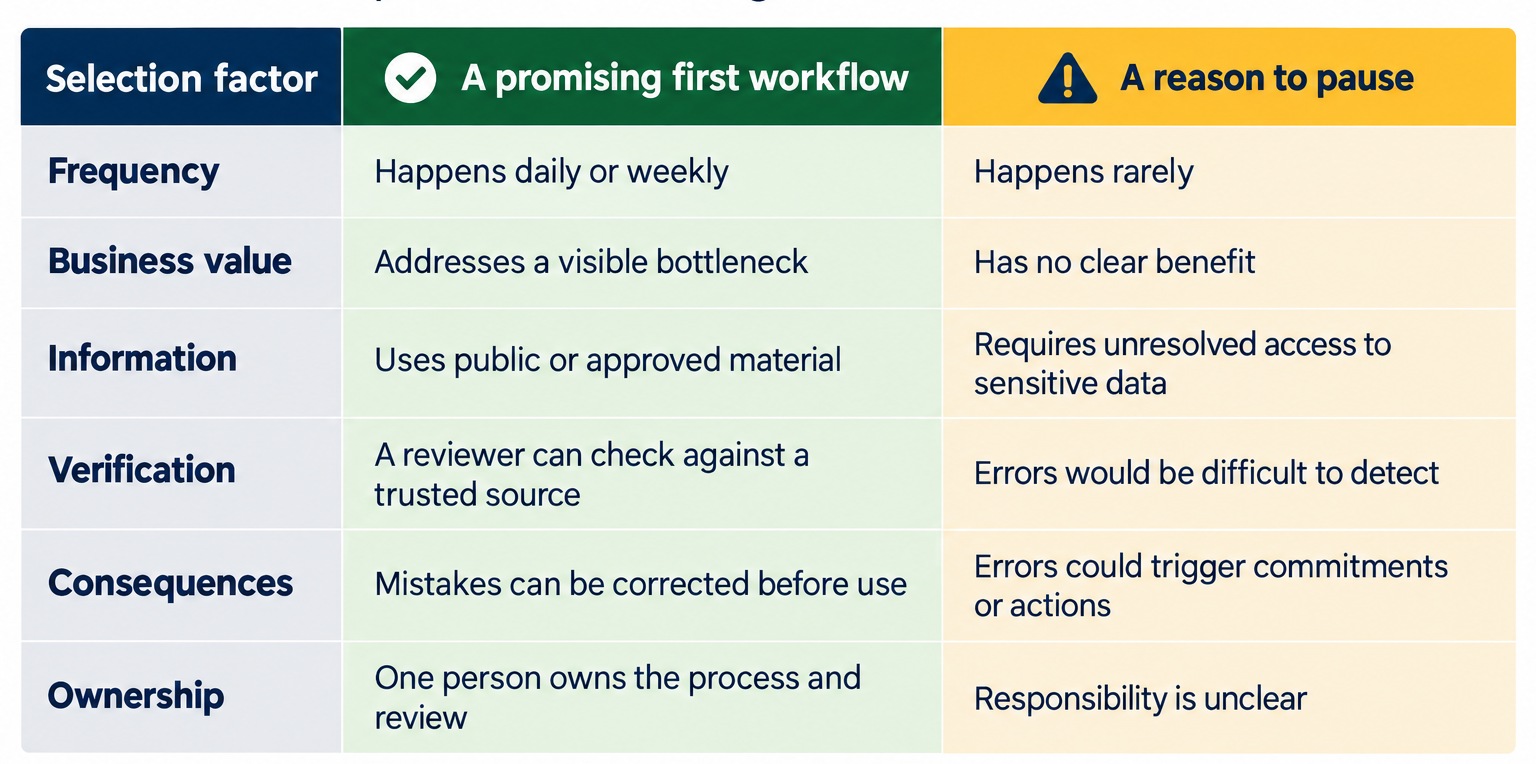
A Simple Workflow Selection Worksheet
Use the table below to compare two or three ideas before selecting one.
Need Managed IT Services?
We are an Award-winning IT Provider and Comprehensive IT Solutions in San Francisco, San Jose, and throughout the Bay Area.
Schedule A Free Consultation
Need Managed IT Services?
We are an Award-winning IT Provider and Comprehensive IT Solutions in San Francisco, San Jose, and throughout the Bay Area.
Schedule A Free ConsultationTreat information handling and review as requirements. A large potential time saving does not compensate for an unresolved data risk or a result nobody can validate.
Three Workflows Worth Evaluating
Repurposing approved marketing content
Use a published article to produce draft social posts or a newsletter introduction. A marketing reviewer checks accuracy, tone, and any claims before publication.
This creates a bounded task with an existing source and a clear reviewer.
Drafting routine internal announcements
Use approved, nonconfidential details to prepare a first draft of an office update or general reminder. The person responsible for the announcement verifies dates, instructions, and wording.
Keep personal information and sensitive business changes outside the pilot unless separately approved.
Turning an approved procedure into a draft checklist
Use an existing, non-sensitive procedure to create a checklist for review. The process owner checks that every required step is present and that AI has not invented additional instructions.
The original procedure remains the authority.
Each example still requires approval for the tool and information involved. The advantage is that the task can be narrowly defined and checked.
Write Down the Workflow Before You Test It
A short description helps employees follow the same process and makes results easier to assess.
For example:
Our marketing coordinator will use an approved AI tool to turn one published company article into three draft social posts. The marketing manager will verify every claim and approve each post before publication. We will compare total preparation time and revision effort with our existing process.
That description establishes the input, task, tool requirement, reviewer, and success measures.
Run the pilot across several examples. Record time spent, corrections required, and whether the output was useful. If review consistently takes longer than doing the work manually, simplify the task or evaluate another candidate.
How TruAdvantage Helps
Book Your Free Consultation Now
Kayvan Yazdi Kayvan Yazdi, Co-founder and CEO of TruAdvantage, has over 25 years of experience in IT and Cybersecurity. With an MBA in Technology Management from Santa Clara University, he helps California and Bay Area's SMBs and nonprofits build secure, compliant, and scalable IT strategies. A speaker, author, and contributor, Kayvan writes for publications such as Modern Biz IT and the Cybersecurity Bulletin and has been featured on multiple podcasts and webinars. He also serves as a Channel Focus Panel Member and National Tech Day representative for the Bay Area. What he loves most about TruAdvantage is its fun, humble culture, a team that’s always learning, and making clients truly happy.
CEO, Co-Founder
Categories: Blog