





Before you read on, ask yourself:
- Do you know which applications your employees use already include AI features?
- When a familiar platform introduces a new AI capability, who reviews it?
- Do employees know whether they are expected or permitted to use it?
When business leaders think about AI, the conversation often begins with a chatbot. Is the team using ChatGPT? Has the company approved Copilot? What information can employees enter?
Those are important questions. But they may not give you the full picture.
AI is also becoming part of the applications your employees already use for meetings, documents, customer service, CRM, and reporting. A team member may encounter a new AI feature while working in a familiar platform, without visiting a separate AI website.
That creates a different question for leadership:
Who knows which AI features are available inside your business applications, and how your team is using them?
In our recent AI in the Workplace Thought Leadership Session, Kayvan Yazdi and Latifa Afitou discussed this shift. As Kayvan explained during the session, AI is becoming embedded in everyday work, which means businesses need to look beyond a list of standalone AI tools.
A Familiar Application Can Introduce a New Question
Imagine your customer service team uses the same platform it has relied on for years. An employee notices an AI feature that could help with an everyday task.
The platform itself is familiar. Your team already uses it, and the employee sees an opportunity to save time.
But the new feature may raise questions that have not yet been discussed:
- Has the organization reviewed this specific feature?
- Who is using it, and for what purpose?
- What information is involved in the task?
- Does the team have guidance on when to use it?
- Who should employees ask if they are unsure?
This does not mean the feature is unsafe or that employees should avoid exploring useful capabilities. It means a familiar application can introduce a new decision for the business.
Need Managed IT Services?
We are an Award-winning IT Provider and Comprehensive IT Solutions in San Francisco, San Jose, and throughout the Bay Area.
Schedule A Free Consultation
Need Managed IT Services?
We are an Award-winning IT Provider and Comprehensive IT Solutions in San Francisco, San Jose, and throughout the Bay Area.
Schedule A Free Consultation
1. Start With the Applications Your Teams Already Use
A useful review starts with the platforms that support everyday work.
Consider applications used for:
- Email and documents
- Meetings and notes
- Customer service
- Customer relationship management
- Research, analytics, and reporting
During the webinar, Kayvan and Latifa discussed how AI is appearing across these types of applications, including tools businesses may already have in place.
You do not need a perfect inventory on day one. Start with the applications that employees rely on most or that handle important business and client information.
Why it matters: A list of approved chatbots may not show where employees encounter AI inside existing workflows.
2. Ask Application Owners What They Know
The people who manage or use an application every day can provide a useful starting point.
For each platform, identify someone who can help answer:
- What AI features are currently available to our team?
- Which features have we enabled or approved, if any?
- Are employees using them? If so, for what?
- What questions has the team raised?
- Does IT or another team need to help review the setup?
The application owner may not have every answer. That is okay. The goal is to identify what is known, where employees see value, and which questions need a closer look.
For example, a customer service manager may know that staff have noticed an AI feature, while the IT team may need to help determine how that feature is configured.
Why it matters: The people closest to the application often see new features and practical uses before those questions reach leadership.
3. Connect Each Feature to a Real Task
Knowing that an application includes AI is helpful. Understanding how employees use it is more useful.
Ask teams to describe the work:
- Are employees using AI to help prepare a first draft?
- Are they summarizing information for a meeting?
- Are they researching a topic or organizing ideas?
- Is the feature connected to customer service, reporting, or another workflow?
Then ask what employees hope the feature will improve. They may be trying to reduce repetitive work, find information more easily, or get started on a task faster.
This conversation gives leadership a better understanding of both the opportunity and the guidance employees may need.
Why it matters: A feature is easier to evaluate when you know the task it supports and the people who use it.
4. Ask What Information Is Involved
Once you understand the task, look at the information involved.
A team brainstorming ideas from public information is having a different conversation from a team working with confidential client, financial, employee, or health information.
For each proposed use, ask:
- What information will employees enter or make available?
- Is the information public, internal, confidential, or regulated?
- What information can the feature access for this task?
- Is this use covered by the organization’s current guidance?
- Who should help if the team is unsure?
The answers will depend on the application, feature, configuration, employee access, and intended use. Application owners and business teams may need help from IT or security to understand the setup.
Why it matters: The information involved can change the conversation, even when employees are working inside an application the business already uses.
5. Make the Decision Clear to Employees
After reviewing a feature, communicate the decision in language employees can use.
Depending on the situation, that guidance might explain:
- Which AI features are approved for use
- What tasks they may support
- What information employees should avoid entering or sharing
- When employees should ask for help
- Who will coordinate further questions or reviews
An employee should not have to guess whether a feature is approved simply because it appears inside a familiar application.
The objective is to make useful AI adoption more intentional, with clear expectations for the people doing the work.
Why it matters: A review helps leadership make a decision. Clear communication helps employees act on it.
A Good Place to Begin This Week
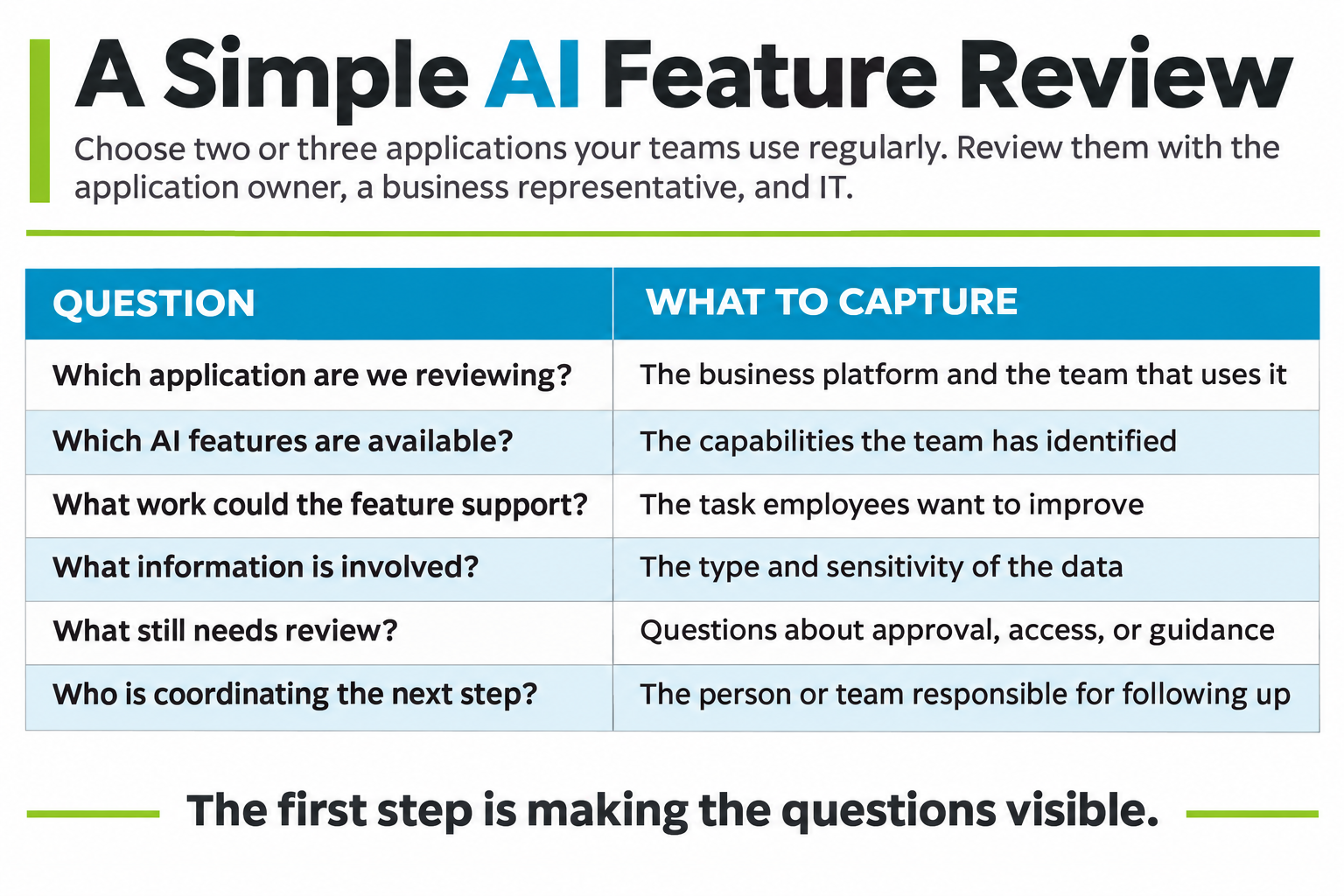
Choose one application your team relies on and ask its owner:
“Have you noticed any AI features in this platform? If so, how are people using them?”
From there, discuss what work the feature supports, what information is involved, and whether employees have clear guidance.
That one conversation can help you move from a general discussion about AI to a practical discussion about how work gets done.
How TruAdvantage Helps
Book Your Free Consultation Now
AI may already be part of the applications your team uses. Understanding which features are available and how employees use them is a useful place to begin.
Kayvan Yazdi Kayvan Yazdi, Co-founder and CEO of TruAdvantage, has over 25 years of experience in IT and Cybersecurity. With an MBA in Technology Management from Santa Clara University, he helps California and Bay Area's SMBs and nonprofits build secure, compliant, and scalable IT strategies. A speaker, author, and contributor, Kayvan writes for publications such as Modern Biz IT and the Cybersecurity Bulletin and has been featured on multiple podcasts and webinars. He also serves as a Channel Focus Panel Member and National Tech Day representative for the Bay Area. What he loves most about TruAdvantage is its fun, humble culture, a team that’s always learning, and making clients truly happy.
CEO, Co-Founder
Categories: Blog